

This are the functions for registration and login:
- Registration
- Activation
- Login, Logout, Send password
- Account data
- Admin user list
- Login control
- Auto login by cookie
- Auto logout
- Ini Parameter
- Data access rights
- Backend
- Customizing
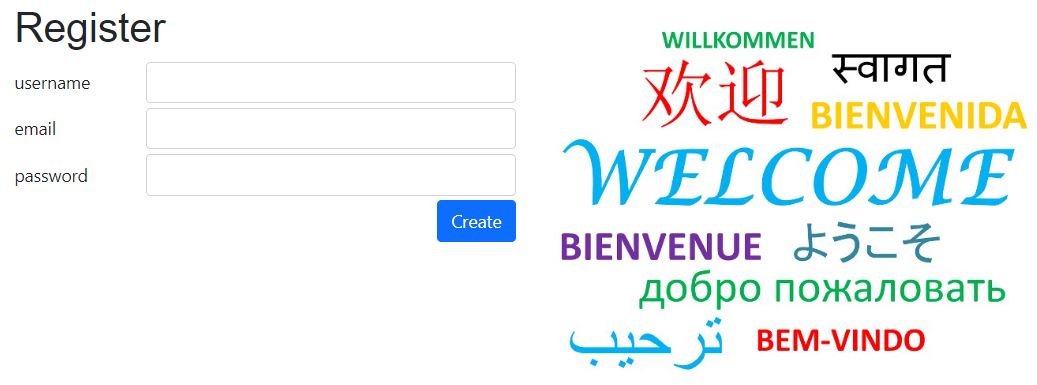
Registration
Password configuration
The password configuration is defined in config/_init.php:
- config:
- passwordrule: "^.{6,12}$" (Regex Tester)
- passwordhint: "6-12 caracters"
- expiration_activation: 144 (hours)
- expiration_pwdreset: 1440 (minutes), validity of the password reset link, the expiry time is shown in the email as {{expires}}
- expiration_pwdinvite: 10080 (minutes = 7 days), validity of the link in the invitation email for a new user (menu "Invite user" in the user list)
Registrations, which are not activated before the expiration will be deleted (executed in the activation function).
Resources:
- page=register (js/example.js)
- datadefID=k8loginregister
- config/_init.php
- domain_registermode
- 0: only username+email
- 1: with address
- 2: register username+email,
my data with address
- domain_registermode
Functions:
- username: unique
- email: unique,
but testmail not unique for testing - password (minlength=6)
To do changes, copy the datadefinition folder "k8loginregister" from "masterdata" to your project folder.
The default roles can be changed in masterdata/k8login/k8login.json:
- columns
- Field: "roles"
- mydefault: "3,5,30"
- Field: "roles"
Activation

The activation (page=activate) is placed in the index.php file.
Reminder and deletion
A user who does not activate the account (k8login.active 0) gets a reminder, and if the account is still not activated it is deleted. This works with domain_useractive 1 and domain_rightmode 0 and 3.
- Reminder:
activation_reminder_hours(default 72) after the registration an email with a new activation link is sent (email templateactivateReminder). The date is stored ink8login.datetimereminder. - Deletion:
activation_delete_hours(default 72) after the reminder the user is deleted, with its tokens. The link of the reminder is valid until then. - In company mode (rightmode 3) also the entries of the user in
k8companyemployeeare deleted, and the companyk8company, if the user created it and is its only employee.
Cron job
The job is the script masterdata/k8activationreminder.php. Call it every hour, e.g. with cron on a server or with the task scheduler on Windows:
0 * * * * curl -s "https://<your domain>/masterdata/k8activationreminder.php?key=<activation_cronkey>"
The answer is JSON: reminded (users who got the reminder), deleted and errors. With &dry=1 nothing is sent or deleted, the answer only lists what would happen.
config/_init.php, $GLOBALS['config']
activation_reminder_hours: hours until the reminderactivation_delete_hours: hours from the reminder to the deletionactivation_cronkey: the key of the cron call; without a key (empty) the script is switched off. Use a long random value and keep it secret.
The text of the reminder is the template activateReminder in k8emailtemplates (one row per language). Without a template $GLOBALS['domain_email']['activateReminder'] is used.
Table k8login: new column datetimereminder (DATETIME, empty until the reminder is sent).
Schedule the job
The job is an address which is called every hour. It is called by the web server and not with php on the command line, because the activation link is built from the host of the request. The address is always:
https://<your domain>/masterdata/k8activationreminder.php?key=<activation_cronkey>
Plesk (Linux)
- Websites & Domains, your domain, Scheduled Tasks (older versions: Cron Jobs).
- Add a task, type Fetch URL, enter the address above.
- Schedule: cron style
5 * * * *(every hour at minute 5). - Notification: do not send an email (or only in case of an error), otherwise you get the answer every hour.
- Alternative: type Run a command with
curl -s "<address>" > /dev/null. - Test it first with
&dry=1at the end of the address and Run now.
Linux without Plesk (crontab)
5 * * * * curl -s "https://<your domain>/masterdata/k8activationreminder.php?key=<activation_cronkey>" > /dev/null 2>&1
Windows (Task Scheduler)
New task, trigger daily and repeat every 1 hour, action curl.exe with the argument -s "<address>".
Please note
- The key is part of the address. It is stored in the access log of the web server and in the task. Use
https, keep the key secret and changeactivation_cronkeyif it becomes known. - A wrong or missing key gives the answer
key not valid(HTTP 403). - Every project (installation) needs its own task with its own key and address.
Invitation from admin
Menu Admin / user list
The admin inserts a new member with user name and email in this form and saves it.
With the function Invite user an email with the username is send to the member.
Get invitation email
With the invitation email the member gets his user name. With the password reset link he can assign his new password.
Login, Logout, Reset password
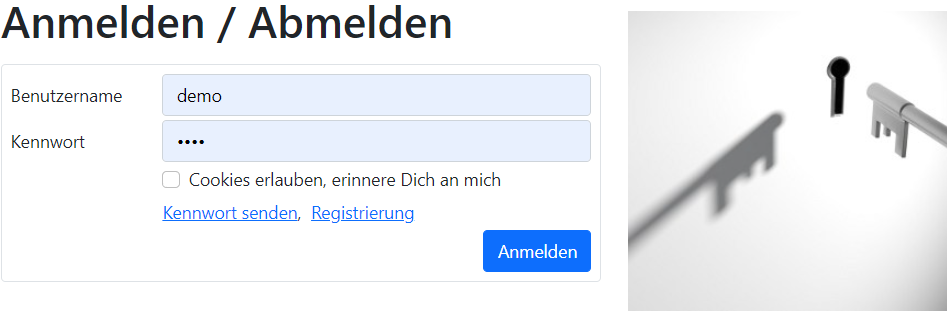
page=login (index.php)
Functions:
- Login
- Logout
- Reset password
Account data
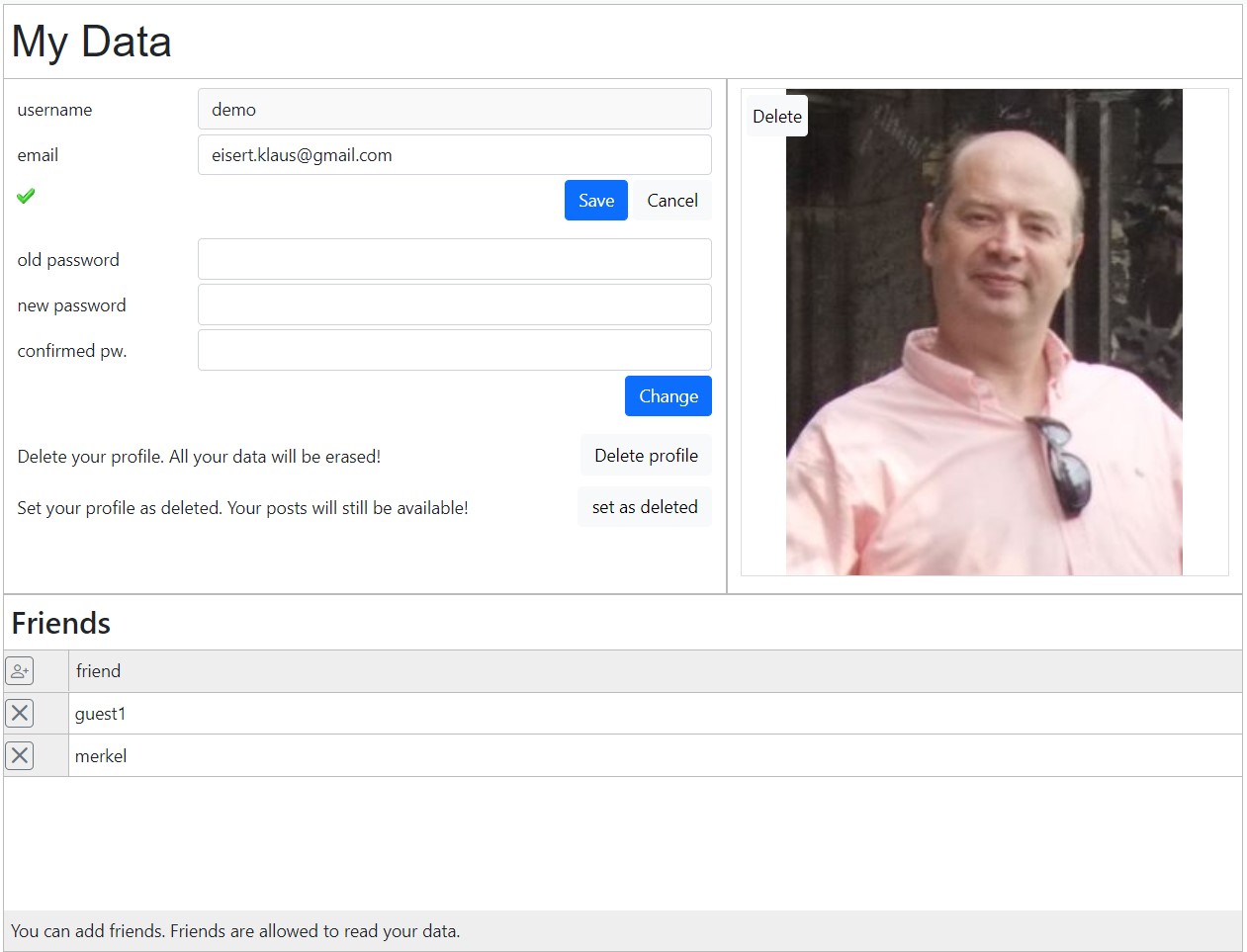
Resources:
- page=mydata (example.js)
- datadefID=k8login
Adopte the appearance of the page with the following parameter in the datadefinition, masterdata/k8login.json:
To disable it all, set it to false:
- upload
- enabled : false
- showdelete : false
- showsetdelete : false
- addfriends : false
Admin user list
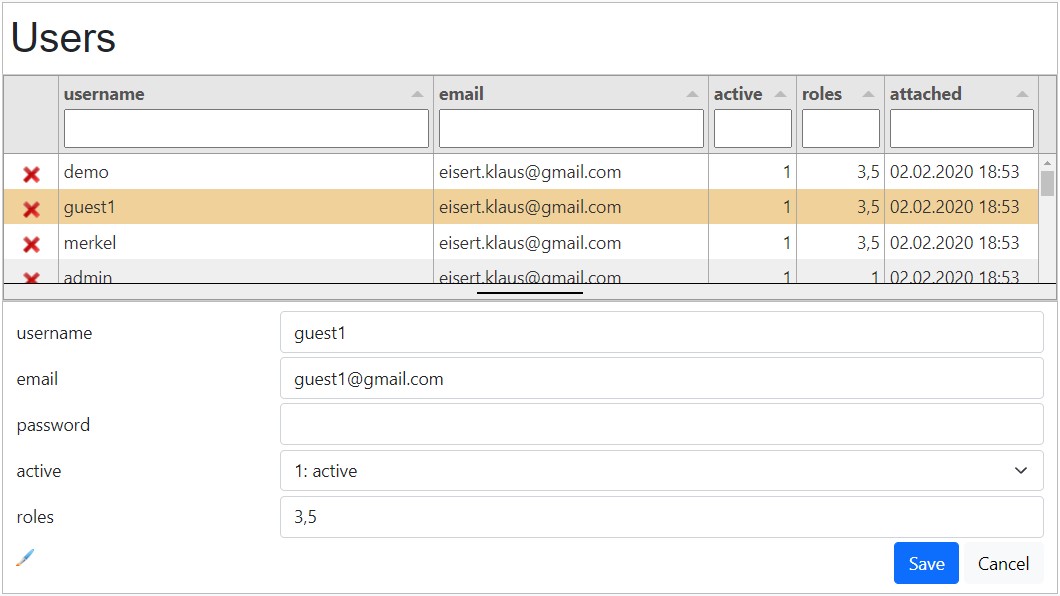
Resources:
- page=user_list (example.js)
- datadefID=k8login
As admin you have the following functions:
- edit user
- delete user
- delete user
- menu top left: Invite user
Login control by page
Query Parameter, for example: page=item_list
For the page "item_list" a logged in user is necessary. _init_page.php, $pages['item_list']:
- login=true
In _init_page.php the login status is checked. If the user is not logged in, the login page is displayed first. By succesful login the required page "user_list" is displayed.
The login control checks:
- page needs login? Yes
- user is logged in? No
-> Login page is displayed first!
Auto login by cookie
- index.php
- masterdata/ProcessData.php
- masterdata/ProcessMethods.php
If the user hooks "remeber me" by login a cookie is set. The following files check the cookie, when the userID is 0 and execute an login:
Thanks to the auto login by cookie you are logged in even you are clicking the save buttons after hours of absence.
Security key of the installation
Every installation has its own security key $GLOBALS['domain_cookiekey'] (64 hex characters, bin2hex(random_bytes(32))). It signs the remember-me cookie login (ID|userID|expires|signature, signature = HMAC-SHA256 over ID|userID|expires|passwordhash).
The key is created automatically and stored in config/_mysql.php (not in the database):
- by the setup dialog at the first start (
_init_page.php); a second system entered there gets its own key - by creating a subdomain (
createSubdomaininmasterdata/ProcessMethod.php): the new installation gets a new key in its ownconfig/_mysql.php
- Keep the key secret and do not copy it to another installation. Whoever knows it can forge login cookies (together with the password hash of the user).
- Without a key there is no auto login; an existing cookie is removed and the login form appears.
- A new key logs out all remember-me users, no data is lost.
- A password change invalidates the cookies of that user.
Auto logout
If no cookie is set the auto logout is active. Each Ajax call resets the timer. The timer "var pagetimer" is set in js/example.js to 20min.
By absence or inactivity your are logged out automtically (default: 20min).
Configuration in init.php
| Parameter | Description |
|---|---|
| domain_registerenabled | 0 : registration is disabled 1 : registration is enabled (default) 3 : registration still in menu, but not yet available |
| domain_registermode | 0 : only username and email 1 : username, email and address 2: register username+email, my data with address |
| domain_useractive |
0 : direct after registration 1 : with activation mail |
| domain_activekey | 1234 : with this factor the activation key is encoded, please put your own number in. |
| domain_readpassword |
0 : off, the password is never read 1 : password read by user and admin 2 : password read only by user 3 : password read only by admin 4 : only password hash is saved, Attention: after installation both values are in the database, change the passwords for this rule! |
| domain_loginenabled | 0 : login is disabled 1 : login is enabled |
| domain_roles | 1 : admin, all rigths for client 2 : superuser, all rights in database 3 : member, logged in user 5 : friends, added in my data 30: right groups, look social groups below |
| domain_rightmode | 0 : Standard 1 : with clients 2 : with right groups |
| domain_development | 0 : off 1 : on 2 : 2=depend on display_errors (default) Attention by 1 and 2 attacks are possible:
|
| domain_PHPupload | false : no PHP code can be uploaded or written anywhere (upload fields, editor, zip import, import of solutions). Default. true : PHP files are allowed. Attention: the value is set after _init.json is read, so only this line in config/_init.php can switch it on. Keep it false, especially on a production server. |
| domain_testemail | empty or example: user@yourdomain.com Normally an email has to be unique in your application. For your own testing this email is an exeption. |
| domain_emailrights | Who may send emails (function sendEmail, see PHP Mail): 0 : no emails 1 : only logged in users, and only to their own email address 2 : logged in users, to every address 3 : only users with the role 2 (superuser) or 32 (email by standard account) 4 : own email configuration, planned. Not yet implemented, the emails are not allowed. Any other value: no emails. |
| [config][expiration_pwdreset] | Validity of the password reset link in minutes (default 1440 = 24 hours). The expiry time is shown in the email with the placeholder {{expires}}. Related: [config][expiration_pwdinvite] (default 10080 = 7 days) for the invitation of a new user, [config][expiration_activation] (hours) for the activation link. |
| domain_email | If you use only your native language write please your own text here. If you use multiple languages, change it please in the masterdata/js/lang_sys_<language>.js file. |
| ['activate']['subject'] | activate your account |
| ['activate']['content'] | Dear member, please activate your account: <a href="{{activation_link}}">activation link</a> Greetings {{domain_name}} |
| ['resetPwd']['subject'] | reset password |
| ['resetPwd']['content'] | Dear member, you ask to reset your password: <a href=\"{{reset_link}}">reset link</a> Greetings {{domain_name}} |
Please edit the file config/_init.php.
Public registration allowed?
No:
- domain_registerenabled=0
If your data is not public, change the read role:
Data access rights with RBAC
RBAC (Role Based Access Control) assigns the user to 1 or more roles. Roles restrict or authorize the access to tables and records. This rights can only be granted by using the login with php sessions. The RBAC is implemented in the PHP data access class. The access check is activated for an object in the datadefinition by setting "rightcheck=1". In the data table the column "creatorID" is added. Comparing the creatorID with the logged in user gives the result: own record or foreign record.
By opening the website the user is assigned to the role "0:public". His userID is also 0. By login the role is replaced by the default roles of the login table: k8login.roles="3,5". The userID is set. For each object or table, for each CRUD operation (create, read, update, delete) and role an access check is implemented.
This is the data access definition in the datadefinition (masterdata.rights):
- CRUD Operation
- Role-ID
- Method for access check
- Role-ID
Thanks to the roles and data access methods, you can easyly grant the rights of your CRUD operations.
RBAC with K8 Web Kit
Users
Users have different statuses:
- guest, not logged in
- member (logged in)
- admin (logged in)
Users and role membership
table k8login:
- userID
- roles (roleID-1, roleID-2)
comma separated roleIDs
Roles
$GLOBALS[domain_roles]:
- roleID:
- name
Operations
- create
- read
- update
- delete
Rules / Methods
- 0: not granted
- 1: table.clientID=SESSION[clientID]
- 2: granted
- ...
- 10: table.creatorID=SESSION[userID]
Datadefinition / table
- CRUD Operation
- Role-ID
- Method for access check
- Role-ID
Users
Each visitior is catagorised.
Users and role membership
The initial roles are the default value in the columns array of the datadefinition "k8login". It can be changed in the user list by super user or admin.
Roles
The roles are defined in:
- config/_init.php
Operations
The operation (CRUD) defines how the rule check is done.
Rules / Methods
The methods are checked before or by executing the sql statement.
Datadefinition / table
In the datadefinition the rights are written in:
- masterdata
- rights
| Operation | SQL command | data access function |
|---|---|---|
| Create | INSERT | add() |
| Read | SELECT | getEntries() |
| Update | UPDATE | update() |
| Delete | DELETE | delete() |
By each CRUD operation the data access is checked in the correspondent data access function.
| ID | Role | Comment |
|---|---|---|
| 0 | public | user not logged in |
| 1 | admin | all rights in a client |
| 2 | superuser | all rights in the database |
| 3 | member | logged in user |
| 4 | employee | logged in user |
| 5 | friend | assigned in table: k8loginfriends |
| 6 | company, own data | domain_rightmode=3 |
| 7 | company, admin | domain_rightmode=3 |
| 19 | company login | domain_rightmode=3 |
| 21 | company read | domain_rightmode=3 |
| 25 | company create standard | domain_rightmode=3 |
| 30 | rightgroups | assigned in tables: k8rightgroups, k8rightmembers |
| x | others | create by yourself |
config/_init.php, domain_roles:
The available roles are defined in the "../config/_init.php".
Roles by login:
Each user can get assigned to 1 or several roles. The default roles can be set in masterdata/k8login/k8login.json, property: columns / roles / mydefault in a comma separated string like "3,5".
Admin / user list:
Superuser or admin can change the user roles in the user_list.
| Number | Check method |
|---|---|
| 0 | no rights |
| 1 | access permission in this client: table.clientID=$_SESSION[clientID] |
| 2 | permission granted |
| 3 | user logged in: $_SESSION[userID]<>0 |
| 4 | table.companyID=$_SESSION[companyID] |
| 5 | table.creatorID=$_SESSION[userID] table.companyID=$_SESSION[companyID] |
| 10 | table.creatorID=$_SESSION[userID] |
| 11 | check friend k8loginfriends.friendID=$_SESSION[userID] |
| 13 | checks membership in right groups |
| 14 | checks the rights of the active right group (rightgroupID) of the user: create: k8rightmembers.rightgroupID=$_SESSION[rightgroupID] and k8rightmembers.userID=$_SESSION[userID] and status>1 read: $table.rightgroupID=$_SESSION[rightgroupID] and k8rightmember.userID=$_SESSION[userID] and status>0 update: $table.rightgroupID=$_SESSION[rightgroupID] and k8rightmember.userID=$userID and ((k8rightmembers.status=2 and $table.creatorId=$userID) or k8rightmembers.status=3)) delete: same update |
| 1000 | check parent table access rights |
| ... | programm your own check |
By each CRUD operation the access rights are checked. If the operation by Create, Update or Delete is not granted, an error is returned. Reading a table can return an empty recordset, because of the missing rights.
By Read the results of the access check for Update and Delete are returned in advance like this:
- in the datadefinitition:
- masterdata.rightuser_create: true
- by reading the recordset:
- rightuser_update: true
- rightuser_delete: true
To check the user right by foreign tables the table can be joined or checked by "EXISTS()":
Access methods can depend:
- on a column of your own table
- or depend on a column of a joined table
This are the default rights (config/_init.php):
| Roles | ||||
|---|---|---|---|---|
| Operation | 0: public | 1: admin | 2: superuser | 3: member |
| Create | 0 | 1 | 2 | 2 |
| Read | 2 | 1 | 2 | 2 |
| Update | 0 | 1 | 2 | 10 |
| Delete | 0 | 1 | 2 | 10 |
table cell = access method:
- =0: denied
- >0: granted by the method
The default rights are declared in the _init.php. They can be overwritten in the datadefinition.
datadefinition:
- masterdata
- defaultrights=true (default)
- rights
- create
- "0":2
- ...
- ...
- create
masterdata/_init.json
This are the default rights of the initialization.
If your data is not public, change the read role:
- "0":0,
Rights from the datadefinition overwrite the default rights. To allow the roles, public and member, to read all records in the object, add in the datadefinition:
The following rights are changed:
- create:
- 0: public
- 2: granted, can register and add a record
- 0: public
- read:
- role "0" public is not allowed to read the data
- update / delete:
- same, like default
Rights from the datadefinition overwrite the default rights. To allow the roles, public and member, to read all records in the object, add in the datadefinition:
Rights from the datadefinition overwrite the default rights. To allow the roles, public and member, to read all records in the object, add in the datadefinition:
| Roles | |||||
|---|---|---|---|---|---|
| Operation | 0: public | 1: admin | 2: superuser | 3: member | 4: employee |
| Create | 0 | 1 | 2 | 0 | 2 |
| Read | 0 | 1 | 2 | 0 | 2 |
| Update | 0 | 1 | 2 | 0 | 10 |
| Delete | 0 | 1 | 2 | 0 | 10 |
table cell = access method:
- =0: denied
- >0: granted by the method
The default rights are declared in the _init.php. They can be overwritten in the datadefinition.
Attention:
The rigths for public tables, for example: "k8pages", need to be changed!
Rights from the datadefinition overwrite the default rights. To allow the roles, public and member, to read all records in the object, add in the datadefinition:
This are the default rights for a scret company in json!
The access right of the table depend on another master table. In this case the master table needs to be checked for the access rights. This is declared in the datadefinition:
Link to master
The masterdatadefID declares the master datadefinition. The first right check is made by this datadefinition. The masterkey defines the colun of this table, which correspond to the master key column of the master datadefinition.
Access right: read
- first the acces rights of the master is checked
- The right of the master is heritated to the child by the method: 1000
Access rights: create, update, delete
- first the right "Update" of the master is checked
- The right of the master is heritated to the child by the method: 1000
In this example the the access for role 2 is granted to all CRUD methods. The role 3 herites the access from the master.
Using clients
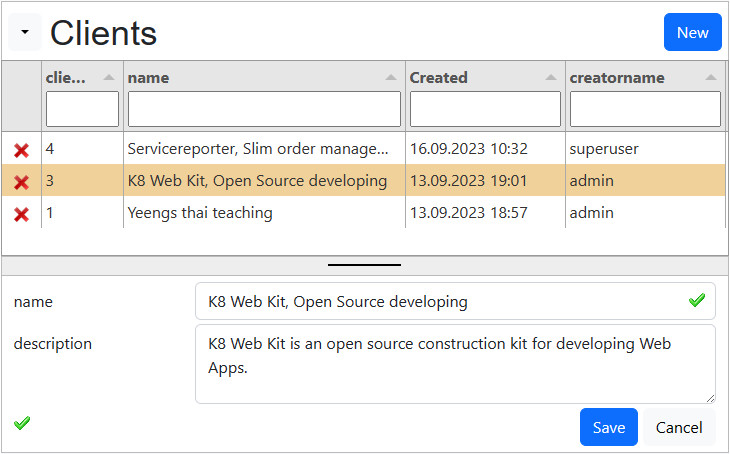
Allow multiple clients to use your Web App. Each table has a clientID to differentiate the data from each other. Each Client has an own admin to govern his data and user. The user registers for 1 client. For each client he needs a different email.
Preparation
config/_init.php:
The domain_rightmode==1 enables:
- register: selection of the client
- menu Admin: display "Clients"
Social groups (right groups)
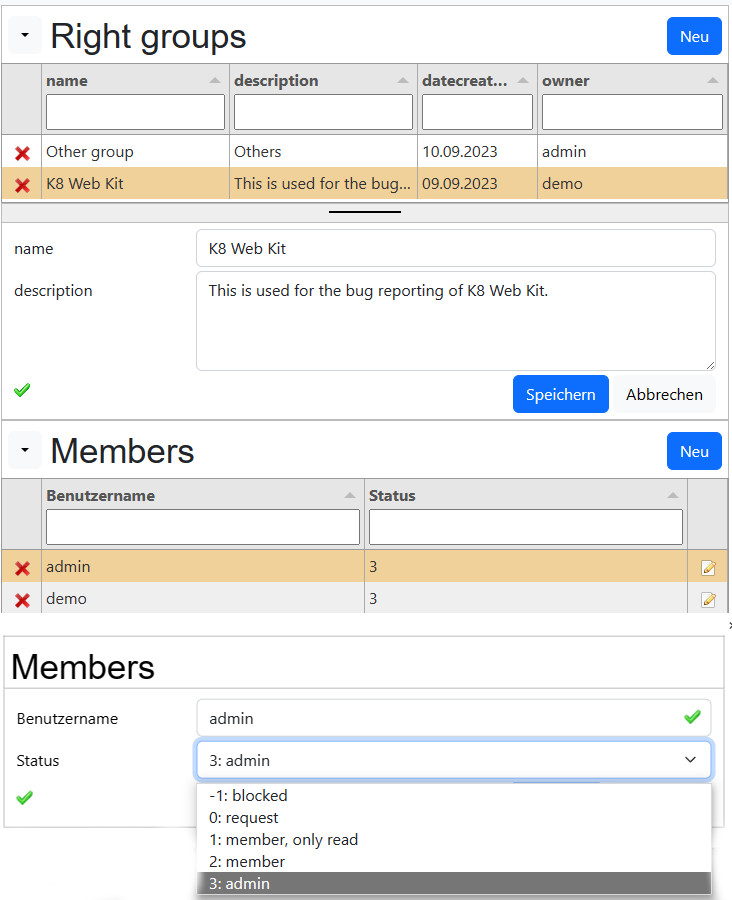
Social groups are part of many social platforms, like facebook and others. Properties of a social group are:
- Title
- Description
- Owner
- Picture
- Members
- Admins
- Observers
- Members
This are the involved datadefinitions:
- k8rightgroups: the group header (folder: masterdata)
- k8rightmembers: the group members (folder: masterdata)
- your table: for example the postings
The rights of the member are defined in the column "status" in "k8rightmembers".
The data access methods are:
- 13: all records with group membership
- 14: filtered to rightgroupID in SESSION
Create a group
- Users with the role 30 have the right to create a right group
- the creator is added as admin
Frontend
- User
- Listing of his groups: membership
- Right group catalog
- Right group form
- Member list (request)
- Admin
- Masterdata form with all groups
13, right group is added by the form
Attention:
- rightgroupID needs to be a field in the form!
This is the "right" definition of the masterdata section:
Your datadefinition
Your table need to contain the column:
- rightgroupID(INT), attention no update
You need to define special rights:
- look above, rights for method 13 or 14
14, filtered to rightgroup in SESSION
Attention:
- right group has to be choosen in My data (SESSION variable)!
This is the "right" definition of the masterdata section:
By writing a new record the rightgroup is filled automatically with the SESSION rightgroupID.
The Menu
The following variables are available in JavaScript:
- dat_user.roles: create a special role for your rightgroups
- rightgroupID: the SESSION[rightgroupID]
- GLOBALS_config['rightidentifiers']: array with all identifiers of the rightgroups with membership.
Preparation (14)
config/_init.php:
The domain_rightmode=2 enables:
- my data: selection of the right group
- data access class:
- validation: check the right group
- add: adds the rightgroupID from SESSION variable
Example for right groups (13): Bug Reports

Elements of Bug Reports:
- Projects
- table: k8projects
- datadefID: projects
- Bug Reports
- table: k8bugs
- datadefID: bugreports
- Bug Fixes
- table: k8bugfixes
- datadefID: bugfixes
Data access:
- Roles:
- 101: Bug fixes
- rightgroups:
- identifier: Bug Reports
Right groups in master data form (13)
The project in the head is assigned to a rightgroup. Without project no new records are allowed. After selecting the rightgroup the rights are checked. The records are displayed. If the create right is granted, a new record can be added.
Example for projects (13)
extract of project datadefinition:
The following rescources are added:
main
- JavaSript file: projects_head_end.js
- datadefinitions: k8rightgroups
masterdata
- the rights are defined
- the SQL statement is expanded with rightgroupname
tabulator
- the rightgroupname is added to the columns
k8form
- the form element rightgroupname is added as datalist
JavaScript:
The following configurations are made:
- GLOBALS_rightmode==2 (14)
- rightgroupname is not displayed
- GLOBALS_rightmode!=2 (13)
- Button "New" is activated
Saas, Company with employees

Allow companies to create an account and to add employees:
Partner portal

Allow partners to collabortate:
Sage 100 connection
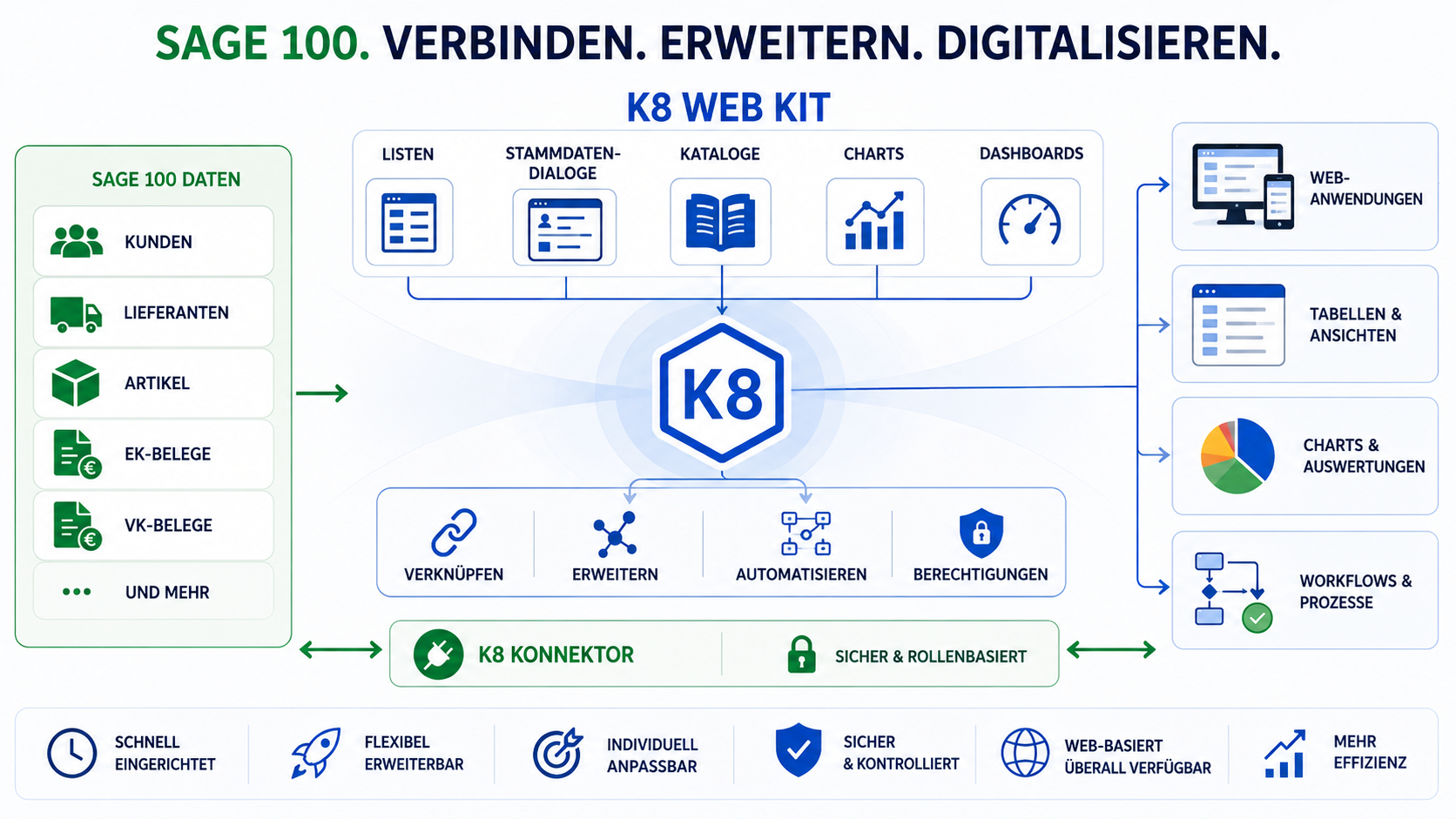
Connect to your Sage 100 database:
Own data access methods
| Operation | Function | Return values |
|---|---|---|
| Create | bRecordAccess() | true / false |
| Read | bRecordReadPermission() |
$out[]:
|
| bRecordUDPermission() |
$out[]:
| |
| Update | bRecordAccess() | true / false |
| Delete | bRecordAccess() | true / false |
bRecordReadPermission()
This function creates a clause which which determines which records are read.
bRecordUDPermission()
This function is called 2 times and creates the columns for the data access "update" and "delete":
- rightuser_update: 0/1
- rightuser_delete: 0/1
In config/_init.php the variable $GLOBALS['domain_includes'] allows to include own PHP files to write your own methods:
- [RBAC_Read]:bRecordReadPermission()
- [RBAC_RUD]: bRecordUDPermission()
- [RBAC_CUD]: bRecordAccess()
Backend
The data access in the backend is controlled by PHP with $_COOKIE and $_SESSION.
$_COOKIE
- login
$_SESSION
- userID
- username
- password
- roles[]
- dat_user[]
table: k8login
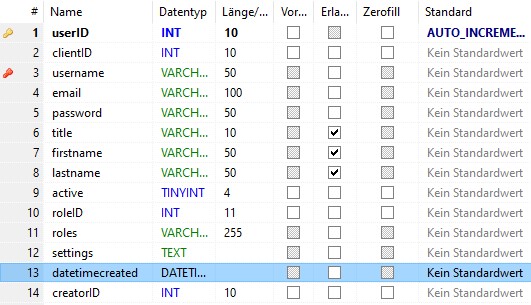
active
- 0 : registrated
- 1 : active
- 2 : blocked
- 3 : deleted
datadefinition=k8login, masterdata/k8login/k8login.json
Resources:
- $_COOKIE
- $_SESSION
- table: k8login
- datadefinition: 5
- k8login.json
Customizing
In the datadefinition under masterdata the include files are defined:
If you are changing it, copy it to your project folder and adopt the path.
k8login_validate.phpAdopte the validation to your needs.
k8login_afterinsert.phpHere you can prepare records for the new members.
k8login_beforedelete.phpIf you have to delete records of this member, please do it here.
| Parameter | Description |
|---|---|
| domain_includes[] | To extend the basic functionality, please use this include files: |
| ['login'][] | array("kitsamples/_kitsamples_login.php"); In the referenced php file you can enter your lines to extend your login. |
| ['logout'][] | array("kitsamples/_kitsamples_logout.php"); In the referenced php file you can enter your lines to extend your login. |
Resources:
- masterdata/k8login.json, masterdata.includes:
- k8login_validate.php
- k8login_afterinsert.php
- k8login_beforedelete.php
- config/_init.php, domain_includes
- login
- logout