 " id="k8-modal-content" alt="modal">
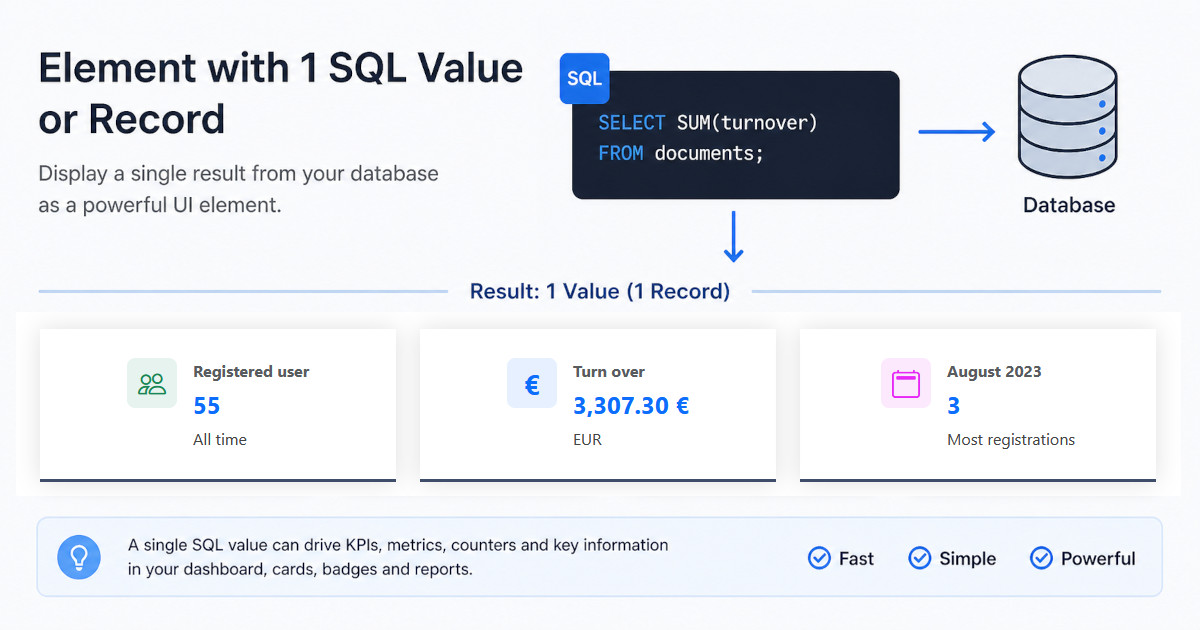
A SQL statement can return a single value or only 1 record. Such an element also needs:
- datadefintion
- sql statement
- rights and roles for reading
- HTML output
This element is based on a detail element and it is requested without a key.
Elements online
By creating the element in 'elements online', please select the following:
- detail template: detail-single
- purpose: chartjs / report
The element is based on the template: detail-single. Necessary configuration are:
- rights for read
- sql statement
- file: <datadefID>_detail_record.html
Normally it's embedded in a page. For testing it stand alone, request it:
- page=single&datadefID=<my datadefID>
Preview
In the preview detail click the single checkbox.
default rights:
Thanks to purpose: chartjs / report the rights for reads are inserted into the datadefinition; change the roles as needed.
Registered user
datadefID: k8loginsingle
Goal
The Element displays the count of all registered users in the table k8login.
The SQL Statement uses the aggregat function count(*); name of the column: result.
More about aggregat functions:
- dev.mysql.com aggregate-functions
file: myproject/k8loginsingle/k8loginsingle_detail_record.html
The HTML element uses the full width of the page. The output is centered horizontally and vertically.
The icon on the left is defined by the class bi-people. More icons can be choosed on icon.getbootstap.com
The title is 'Registered user'.
The placeholder {{result}} displays the count of all records. Beneath the text 'All time' is typed in.
The HTML tag with the class rec_foot displays the line at the bottom.
Alternative: last 4 weeks
datadefID: k8loginsingle
Filter with WHERE
The registrations of the last 4 weeks should be displayed. The SQL statement gets a WHERE condition:
- datetimecreated >= NOW() - INTERVAL 4 WEEK
Turn over
datadefID: k8documentssum
Goal
The Element displays the turn over of all invoices of the table 'k8documents'.
The SQL Statement uses the aggregat function sum(); name of the column: amount_gross.
Formatting
The formatting is taken from the tabulator field. The column result is not in tabulator. Solution:
- name the column same to it's origin: amount_gross
- add result with formatting in tabulator section
file: myproject/k8documentssum/k8documentssum_detail_record.html
The HTML element uses the full width of the page. The output is centered horizontally and vertically.
The icon on the left is simply the symbol €.
The title is 'Turn over'.
The placeholder {{amount_gross}} displays the sum of all records. Beneath the text 'EUR' is typed in.
The HTML tag with the class rec_foot displays the line at the bottom.
datadefID: k8documentssum
Filter
We want to filter the year. But the column year is not defined in the table k8documents. Solution:
- use the column 'docdate' with '>2025-01-01' and '<2025-12-31'
- declare a new column year in the columns section, look to the example
Filter with url query string
Filter from url:
- <my website>/index.php?page=single&datadefID=k8documentssum&year=2022
A hidden filterobject is added into the masterdata section with the hidden column 'year'.
Most registrations
datadefID: k8logincountmonth
Goal
The SQL statement counts the registrations for every month, sorts it in descending order and gives back the first record.
It's a derived statement to allow the column year to be used as filter.
sql_limit needs to be declared as separate value. The output is limited to 1 record.
SQL Statement:
The sql statement returns a record with the columns:
- year
- month
- monthname
- count
datadefinition, filter:
filterobject
Thanks to a hidden filter object the query string "year" in the url can be used as filter for the sql statement. More to the filter object in:
file: myproject/k8logincountmonth/k8logincountmonth_detail_record.html
The HTML element uses the full width of the page. The output is centered horizontally and vertically.
The icon on the left is defined by the class calendar2.
The title displays the columns: {{monthname}} {{year}} .
The placeholder {{count}} displays the count of the month. Beneath the placeholder monthname and year are shown. In the 3rd line the text 'Most registrations' is typed in.
The HTML tag with the class rec_foot displays the line at the bottom.
file: myproject/k8logincountmonth/k8logincountmonth_head_end.js
The function k8.datadefAddSearchFilterForm() does:
- reads the year from the query string
- creates a hidden form with the year
- adds a call back function
- builds the filter