
Colored groups
Groups allow you to assign fixed values to fields.
Groups can be defined by:
- Group definition
- _init.php, domain_basicgroups
The corresponding table is k8groups. The rights can be restricted to special roles.
Another table k8grpubs with the same structure is readable for everyone, the public groups.
Colored groups are supported:
- in the tabulator list
- by the select element of the form
Colored groups enriches the visibility of data structures. They are easy to implement in K8 Web Kit.
Group pages
| Group | datadefID | url | Comment |
|---|---|---|---|
| Public groups | k8grpubs | p/publicgroups | every body can read it |
| Basic groups | k8groups | p/basic | defined in _init.php domain_basicgroups |
| User groups | k8groups | p/usergroups | defined in Group definition dialog, displays only the groups of the logged in user |
| Main groups | k8groups | p/groupdefinitions | defined in Group definition dialog, displays all groups |
This is an overview about the group definitions:
- Where they are defined
- How they are called
Groups in configuration
config/_init.php
The function k8.datadefAddcoloredgroups() adds the necessary call back functions, by "new", "load" and change to the datadefintion.
Group definition dialog
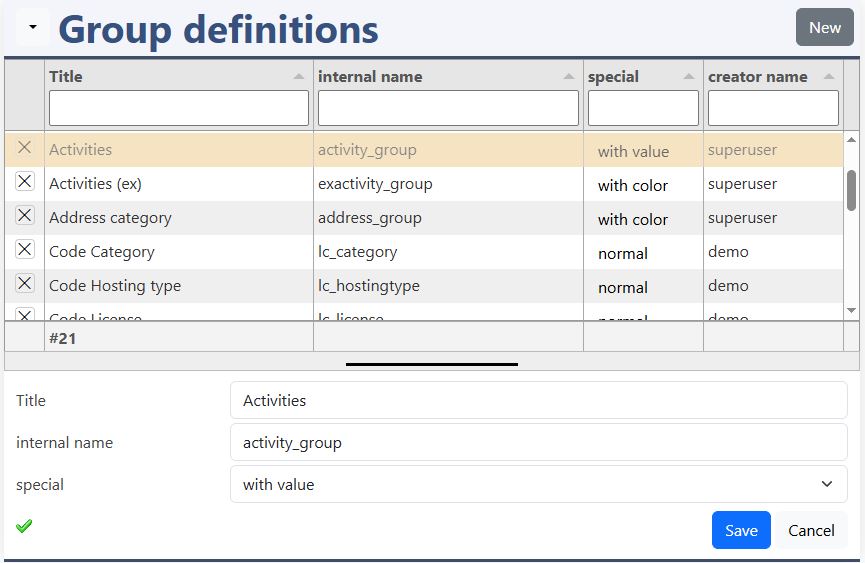
title
This is the displayed title of the group.
Internal name
The internal name is the fixed type in k8groups.
Spcecial
- normal
- with color
- with value
- with color and value
Add color
Javascript: kitsamples/workflowtitle/workflowtitle.js
The function k8.datadefAddcoloredgroups() adds the necessary call back functions, by "new", "load" and change to the datadefintion.
tabulator
datadefinition:
In the "head" a special CSS is added to improve the visibility of the selected row.
The header filter configures the allowed values. For the row a special color-formatter is used. The placeholder "#function#k8tabulatorformatter#" will be exchanged with the JavaScript function "k8tabulatorformatter()". The formatter is configured with values and colors.
k8form
datadefinition:
head_end
Javascript handles the events of the form and changes the color of the select tag.
k8form, select
The HTML tag "select" has the normal options with "value" and "text" and the additional color informations in the attributes:
- data-fontcolor
- data-backgroundcolor
Groups
The colored groups are displayed with the selected font and background. With the edit button, both colors can be changed.
optionsadditional
In the optionsadditional the datadefinition "datadefID" with the clause "defaultclause" is defined as source of the records. With the "column_mapping" the columns of the source are mapped to the current definition. The corresponding tabulator column is configured in "tabulatorcolumn". The "fieldname" is the correspondig field in "k8form". The "emptytext" is displayed in the "select" element of the form.
section tabulator
The headerfiler, formatter and formatterparams have to be declared. The values are generated automatically and inserted into:
- headerfilter.values
- formatterParams.values
section k8form
The "tagName" has to be configured as "select". The "options" are inserted automatically.