 " id="k8-modal-content" alt="modal">
Bug reports

- Describing the problem
- Providing steps to reproduce the issue
- Noting the environment in which the issue occurred (e.g., operating system or software version)
- Including screenshots or error messages to assist developers in understanding the issue
Effective bug reporting is clear, detailed, and easy for the development team to follow, ensuring that the bug can be reproduced and resolved efficiently.
Rights, the roles:
- 3: members, who report a bug
- 30: employees, who create the right groups
- 101: dvelopers, who fix the bug
Right groups
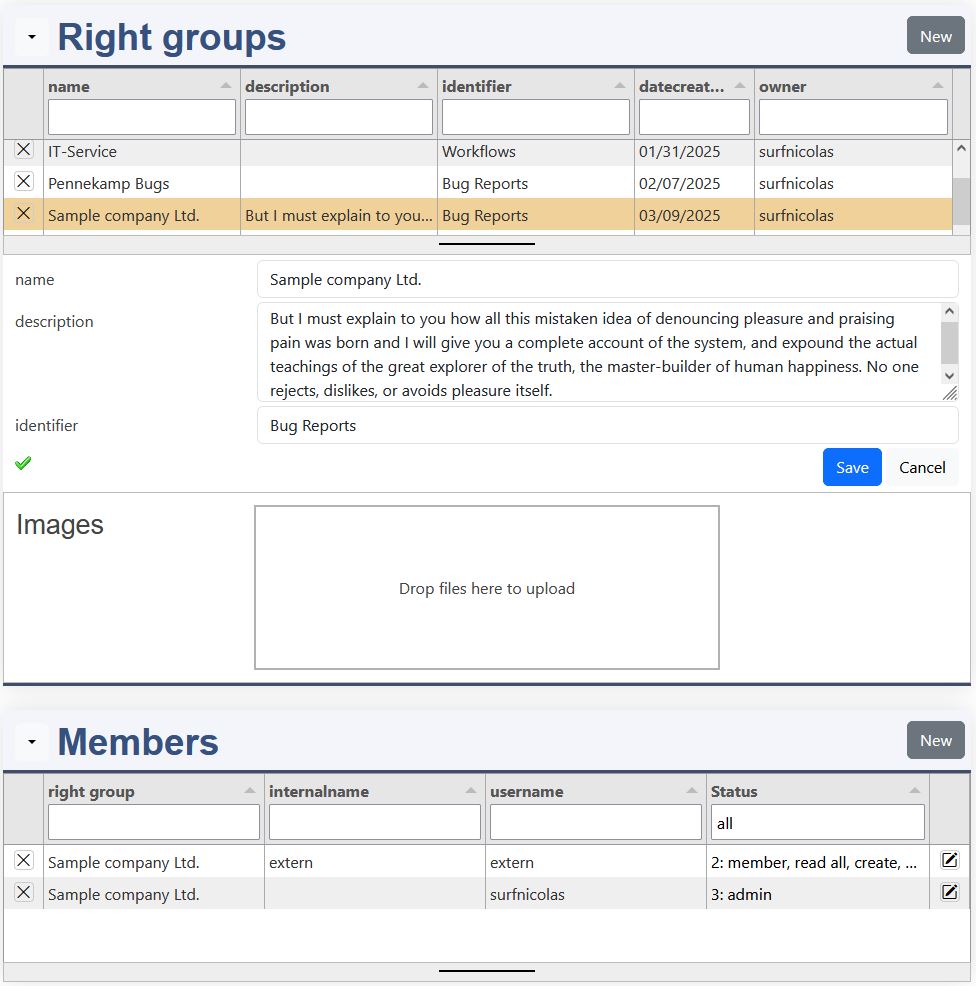
The right groups allows you to limit your company data to specific data for your partners.
Right groups
Name
Give a specific name to your rightgroup, for example the name of your customer.
Description
Describe the goal of this group.
Identifier
This field is not used yet.
Upload
Upload a picture, which is displayed in the rightgroup catalog.
Members
username
The username of your member.
Internal name
With the internal name you designate an employee or partner to be member. Send him a link (company / employee) which he can use to register in your company.
Status
- 0: request, need to be executed by the admin
- 1: observer, can only see the data of this group
- 2: member, can enter data and delete and update his records
- 3: admin, manage the group and has all rights
Projects

Define your projects:
- enter the project name
- enter the right group
- describe the project
The description should contain:
- an instruction about the parts being tested
- a link or hint, how to start the programm
Reports

Report a bug with comprehensive information that allows it to localize it and to reproduce it. Add sreenshots, which also shows the displayed or entered data.
The Bug Reporting consist out of this 3 tasks:
- The programm tester discovers a bug (Bug Position).
- The developer fixes the bug (Bug Fix).
- Checked: The tester checks, if the bug is fixed (Bug Position).
Project choice
Please, choose first a project. The available projects are displayed in the datalist field. They depend on the right group, in which the logged in user is in.
Bug Position
Title
The title should be unique and give a first impression of the bug.
Programm part
The progamm part is mostly the element name, in which the bug occured.
Event
The Event is the button or the action, which was clicked last.
Description
The circumstances and details for the bug should be noted here.
Source Version
The source version is important to mention.
Creator
The creator is automatically entered.
created
The created date is automatically entered.
checked
After the bug fix is done, it has to be checked by the person, who reported it.
Upload attachement
Adding a screenshot to the bug helps a lot to solve the problem. Please note that all data is clearly legible.
Bug Fix
The bug fixing is made by the developer. Developers need to be in the role 101.
Remark
This is the remak of the developer / processor.
Processed
The date of the bug fixing is displayed here.
Version
The programm version, in which the bug is fixed.
Priority
Not all bugs can fixed immediately. Priority 1 is the heighest priority.
Status
The status are:
- 0: open
- 1: started
- 2: done
Processor name
The processor / developer is entered automatically.
ERM (Entity Relationship Model)
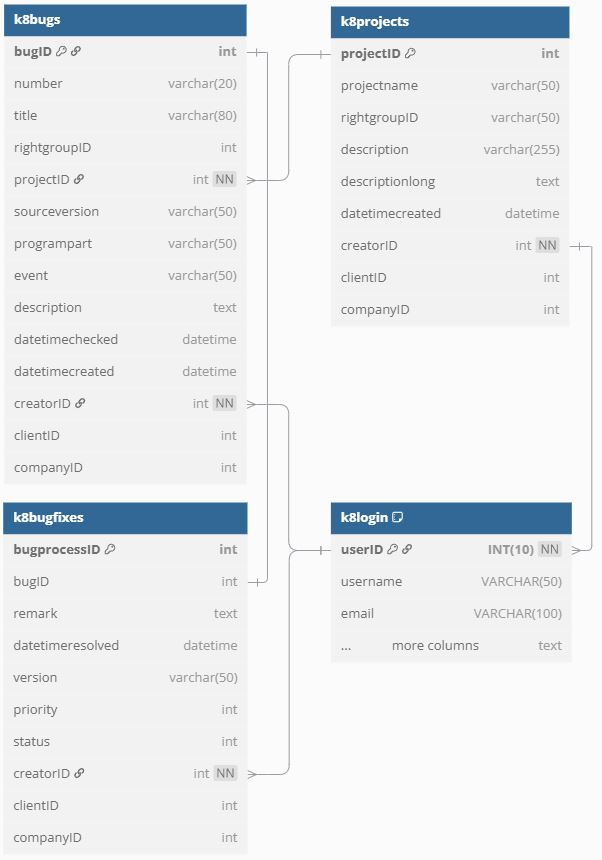
The ERM displays the tables and the realation between them. Each table is assigned a data definition:
- projects
- bugs
- bugfixes
Between bugs and bugfixes is a 1:1 relation. The creators of bugs are the tester. The creators of the records in bugfixes are the developer.